Finding the Right Cloud Accounting Software for Your Small Business: A Journey to Financial Freedom
The transition from a solopreneur to a small business owner is exhilarating, but it also comes with new responsibilities, especially when it comes to finances. Managing invoices, tracking expenses, and staying on top of your cash flow can feel overwhelming. This is where cloud-based accounting software steps in, offering a streamlined and user-friendly solution to manage your finances, no matter where you are. But with so many options available, choosing the right software can be a daunting task. Fear not! This guide will take you through the process of selecting the best cloud-based accounting software for your small business, helping you navigate the complexities and find the perfect match for your needs.
Understanding Your Needs: The Foundation of Your Search
Before diving into the vast sea of accounting software options, it’s crucial to understand your unique requirements. Every small business is different, with varying levels of complexity and specific financial needs. Ask yourself: What are your primary goals for using accounting software? Do you need to track inventory, manage multiple projects, or integrate with other business tools? What is your budget? What level of technical expertise do you and your team possess? By answering these questions, you’ll gain clarity on the features and functionalities that are essential for your business.
For instance, if you’re a solopreneur with a simple business model, you might need a basic software with invoice creation and expense tracking capabilities. However, if you’re running a growing e-commerce store with multiple inventory locations, you’ll need software with advanced inventory management features, purchase order tracking, and integration with your online store. Similarly, if you’re a service-based business with multiple projects, you’ll need a software that allows you to track project budgets, allocate resources, and generate detailed reports.
Once you have a clear understanding of your needs, you can start narrowing down your search by focusing on software solutions that cater specifically to your industry and business model.
Exploring the Landscape: A Comprehensive Look at Top Contenders
The market for cloud-based accounting software is bustling with a diverse range of options, each offering a unique set of features and functionalities. To help you navigate this landscape, let’s explore some of the most popular and highly-rated contenders, highlighting their strengths and weaknesses:
1. QuickBooks Online:
QuickBooks Online is a household name in the accounting software world, known for its user-friendly interface and comprehensive features. It’s a robust platform that caters to businesses of all sizes, from solopreneurs to established enterprises. One of its key strengths is its intuitive design, making it easy for both beginners and seasoned professionals to navigate. QuickBooks Online offers a wide range of features, including invoicing, expense tracking, bank reconciliation, payroll management, and inventory control. It also integrates seamlessly with other popular business tools, like Shopify, PayPal, and Stripe, streamlining your workflow.
However, QuickBooks Online can be expensive, especially for businesses with complex needs. Its pricing plans can escalate quickly, and it might not be the most cost-effective solution for small businesses with limited budgets. Additionally, while it offers excellent customer support, there have been reports of occasional technical glitches and slow loading times.
2. Xero:
Xero is another popular cloud-based accounting software that has gained significant traction among small businesses. It’s known for its powerful reporting capabilities, allowing you to gain valuable insights into your business performance. Xero also boasts a user-friendly interface and offers a wide range of features, including invoicing, expense tracking, bank reconciliation, inventory management, and payroll. It’s highly customizable, allowing you to tailor the software to your specific needs.
One of Xero’s key strengths is its robust mobile app, which allows you to access your accounts and manage your finances on the go. This is particularly beneficial for small business owners who are constantly on the move. However, Xero’s pricing can be a bit steep, and its customer support has been criticized for being less responsive than some other competitors.
3. FreshBooks:
FreshBooks is a popular choice for freelancers and small businesses that need a simple and easy-to-use accounting software. It’s known for its user-friendly interface and intuitive design, making it an excellent option for beginners. FreshBooks offers a wide range of features, including invoicing, expense tracking, time tracking, and project management. It also integrates seamlessly with other popular business tools, like PayPal, Stripe, and Google Workspace.
One of FreshBooks’ key strengths is its affordable pricing plans, making it an attractive option for budget-conscious businesses. However, FreshBooks lacks some of the advanced features found in other accounting software solutions, such as inventory management and payroll. It’s also worth noting that its customer support can be slow to respond at times.
4. Zoho Books:
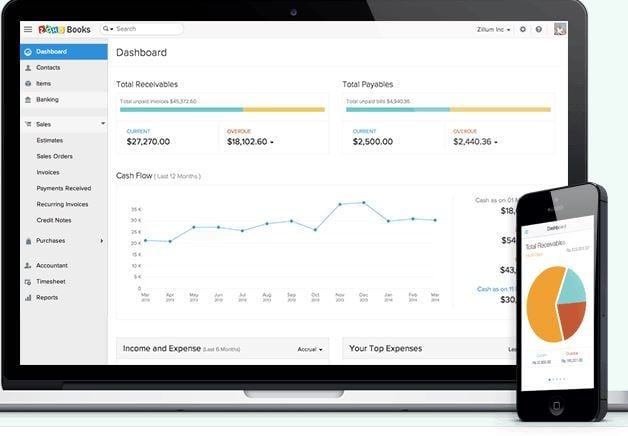
Zoho Books is a comprehensive cloud-based accounting software that offers a wide range of features, making it suitable for businesses of all sizes. It’s known for its customizable dashboards, allowing you to track your key metrics and gain valuable insights into your business performance. Zoho Books also offers excellent integration with other Zoho products, such as CRM and project management, making it a comprehensive solution for businesses that need to manage multiple aspects of their operations.
One of Zoho Books’ key strengths is its affordable pricing plans, offering a range of options to suit different business needs. However, its interface can be a bit clunky compared to some of its competitors, and its customer support has been criticized for being less responsive.
5. Wave Accounting:
Wave Accounting is a free cloud-based accounting software that offers a robust set of features, making it an attractive option for small businesses with limited budgets. It’s known for its simple and intuitive interface, making it easy for beginners to use. Wave Accounting offers features such as invoicing, expense tracking, bank reconciliation, and reporting. It also integrates seamlessly with other popular business tools, like PayPal and Stripe.
One of Wave Accounting’s key strengths is its free plan, which provides access to core accounting features for businesses with limited transaction volume. However, its free plan has limitations, and businesses with higher transaction volumes will need to upgrade to a paid plan. Additionally, Wave Accounting’s reporting capabilities are not as advanced as some of its competitors.
Making the Right Choice: Factors to Consider
Choosing the right cloud-based accounting software for your small business is a crucial decision that can significantly impact your financial management and overall business success. It’s not just about finding the software with the most features; it’s about finding the software that best aligns with your specific needs and goals. Here are some key factors to consider:
1. Features and Functionality:
The first and most important factor to consider is the features and functionality of the software. What are your primary needs? Do you need to track inventory, manage multiple projects, or integrate with other business tools? Make a list of your essential features and prioritize them based on your business requirements.
2. User Interface and Ease of Use:
The user interface of the software should be intuitive and easy to navigate, regardless of your technical expertise. Look for software with a clean and uncluttered design that makes it easy to find the information you need. Consider trying out free trials or demo versions to get a feel for the interface before committing to a paid plan.
3. Integration with Other Business Tools:
Integration with other business tools, such as e-commerce platforms, payment gateways, and CRM systems, can significantly streamline your workflow and save you time. Look for software that offers seamless integration with the tools you use daily.
4. Mobile App:
A robust mobile app allows you to access your accounts and manage your finances on the go, which is particularly beneficial for small business owners who are constantly on the move. Consider whether a mobile app is essential for your business needs.
5. Customer Support:
Reliable customer support is crucial, especially when you encounter technical issues or have questions about the software. Look for software that offers multiple support channels, such as phone, email, and live chat. Consider reading customer reviews to gauge the responsiveness and quality of customer support.
6. Pricing:
Pricing is a significant factor to consider, especially for small businesses with limited budgets. Look for software that offers flexible pricing plans to suit different business needs. Consider the features included in each plan and compare the value proposition of each option.
7. Security:
Data security is paramount, especially when you’re storing sensitive financial information in the cloud. Look for software that uses industry-standard security measures to protect your data. Consider reading reviews and checking for security certifications to ensure the software meets your security standards.
8. Scalability:
As your business grows, you’ll need software that can scale with your needs. Look for software that offers flexible plans and features that can adapt to your changing requirements.
9. Reporting and Analytics:
Robust reporting and analytics capabilities allow you to gain valuable insights into your business performance and make informed decisions. Look for software that offers customizable reports and dashboards to track your key metrics.
10. Industry-Specific Features:
If your business operates in a specific industry, look for software that offers industry-specific features and functionalities. For example, if you’re in the retail industry, you’ll need software with inventory management features. If you’re in the service industry, you’ll need software with project management features.
Embarking on Your Journey: A Step-by-Step Guide
Now that you have a clear understanding of your needs and the key factors to consider, it’s time to embark on your journey to finding the best cloud-based accounting software for your small business. Here’s a step-by-step guide to help you navigate the process:
1. Research and Compare:
Start by researching different cloud-based accounting software options. Explore their websites, read reviews, and compare their features and pricing. You can also use online comparison tools to narrow down your search and find the best options based on your specific needs.
2. Try Free Trials or Demo Versions:
Most accounting software providers offer free trials or demo versions that allow you to test the software before committing to a paid plan. This is an excellent opportunity to get a feel for the user interface, explore the features, and see if the software meets your requirements.
3. Request a Personalized Demo:
If you’re unsure about a particular software, you can request a personalized demo from the provider. This allows you to ask questions and get a more in-depth understanding of the software’s capabilities.
4. Consider Your Team’s Needs:
If you have a team, make sure to consider their needs and preferences when choosing accounting software. Ensure the software is easy to use and provides the features they require to perform their tasks effectively.
5. Read Customer Reviews:
Customer reviews can provide valuable insights into the software’s strengths and weaknesses. Look for reviews from businesses similar to yours to get a realistic perspective on the software’s performance and customer support.
6. Check for Security Certifications:
Data security is paramount, so ensure the software you choose has industry-standard security certifications, such as SOC 2 and ISO 27001.
7. Make a Decision and Get Started:
Once you’ve considered all the factors and narrowed down your choices, it’s time to make a decision and get started. Choose the software that best aligns with your needs and budget.
Beyond the Software: Mastering Financial Management
Choosing the right cloud-based accounting software is just the first step. To truly master financial management and achieve financial freedom, you need to embrace a proactive and strategic approach. Here are some tips to help you get the most out of your accounting software and take control of your finances:
1. Set Up Your Chart of Accounts:
A well-organized chart of accounts is the foundation of effective financial management. It allows you to categorize your income and expenses, providing a clear picture of your financial performance.
2. Track Your Income and Expenses:
Regularly track your income and expenses to ensure you have a clear understanding of your cash flow. Use your accounting software to automate this process and generate detailed reports.
3. Reconcile Your Bank Accounts:
Reconciling your bank accounts regularly helps you identify discrepancies and ensure your financial records are accurate. Most accounting software offers tools to simplify this process.
4. Create a Budget and Forecast:
A budget helps you plan your spending and allocate resources effectively. A forecast allows you to predict future financial performance and make informed decisions.
5. Generate Financial Reports:
Use your accounting software to generate financial reports, such as income statements, balance sheets, and cash flow statements. These reports provide valuable insights into your business performance and help you identify areas for improvement.
6. Stay Organized and Consistent:
Maintaining consistent financial records is essential for accurate financial reporting and informed decision-making. Use your accounting software to automate tasks, streamline processes, and ensure your records are up-to-date.
7. Seek Professional Advice:
If you’re unsure about financial management best practices, don’t hesitate to seek professional advice from an accountant or financial advisor. They can provide valuable guidance and support to help you make informed financial decisions.
Conclusion: Embracing a Brighter Financial Future
Choosing the right cloud-based accounting software is a crucial step in the journey to financial freedom for your small business. By understanding your needs, exploring the landscape of available options, and considering key factors such as features, ease of use, integration, and security, you can find the perfect software to streamline your finances and empower you to make informed decisions. Remember, financial management is an ongoing process that requires proactive engagement and a strategic approach. Embrace the tools and resources available, stay organized, and seek professional advice when needed. With the right software and a commitment to financial discipline, you can pave the way for a brighter and more prosperous future for your small business.


